Return Order
Return Orders help you process returns from your customers. Essentially, it's an ordinary Receiving Order, but you receive goods from a Customer returning them to you for some reason.
Required Permissions
- View Receiving Orders
- ability to search and view Return Orders
- Modify Receiving Orders
- ability to add, view, edit, cancel and close Return Orders
- Receive
- ability to add, edit and delete order line details
- ability to return stocks in Return Orders
- ability to use Assign To All functionality
- Unreceive
- ability to unreceive previously returned stocks
- View Reports
- ability to print and export Return Order Reports
- View Cost
- ability to view Amount in Return Orders
- ability to view Unit Cost of lines in Return Orders
- Modify Cost
- ability to view Amount in Return Orders
- ability to view and edit Unit Cost of lines in Return Orders
Return Order Processing
Go to Orders and click on Add Return Order:

The following window will show up:
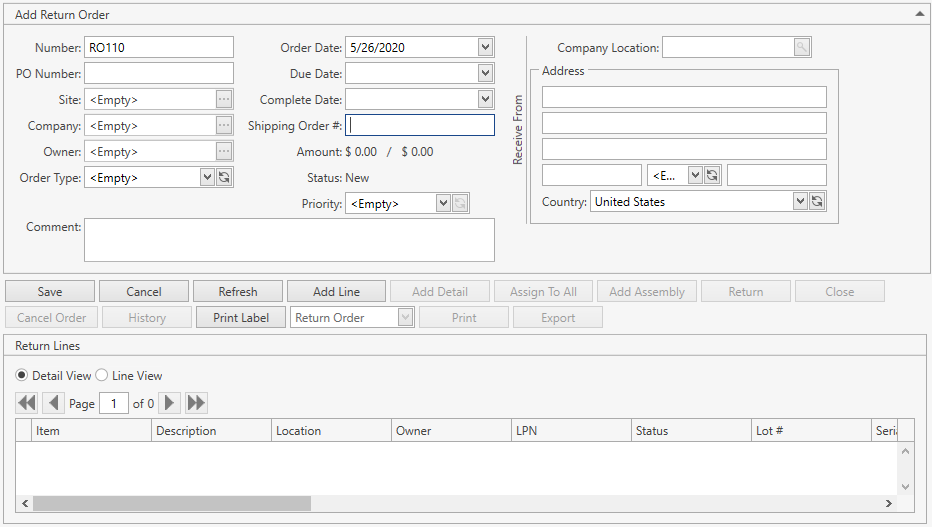
As you can see, the Return Order layout is pretty much like that of a Receiving Order. The biggest exceptions are the following:
- in the order header you're selecting a Customer instead of a Vendor in Company field;
- you can specify a reference to a Shipping Order this return is created against – use Shipping Order # field for this;
- Return button is displayed instead of Receive;
- reports that are available for Return Orders are the same as for Receiving Orders, but they have different names:
- Putaway Ticket Return Order
- Return History
- Return Order
- Return Receipt
Please refer to Receiving Order section for details on how to work with Receiving Orders.
You can also open up existing Orders from Search Receiving Order screen – make sure to checkmark Return flag to make CoreIMS search for returns as well.